
Cancel or follow up on an app access approval
Manually cancel a stalled app access approval or nudge the approver, right from the request.
What this does
Sometimes an app access approval sits pending too long — the approver is out, or the request is no longer needed. You can now step in directly from the request instead of waiting.
How it works — step by step
1. Open the request that has a pending app access approval.
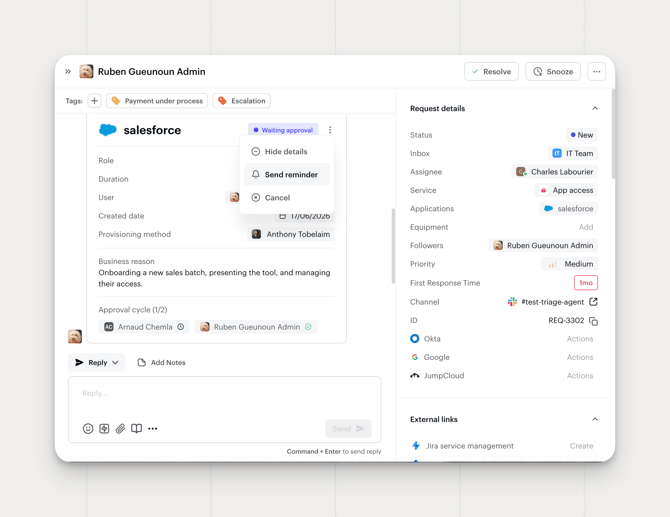
2. Next to the Waiting approval status, click the ⋯ menu. You'll see two options: Send reminder and Cancel.
3. To cancel: click the cancel icon and confirm. Siit marks the app access approval as expired.
4. To nudge the approver: click the reminder icon. Siit sends a one‑click reminder immediately, and logs it as an event on the request timeline.
Availability
Available on the Pro plan.
Frequently asked questions
Who can do this? Any admin who has access to the request.
Is this different from canceling a standard approval? No, it's the same cancel/reminder mechanic you already use on standard approvals, now available for app access approvals as well.