---
title: Create forms with dynamic fields
description: Create forms with dynamic fields
---
[Skip to content](https://help.siit.io/create-forms#main-content)
[](https://help.siit.io/?hsLang=en)
- [Help Center](https://help.siit.io/)
- [Docs](https://docs.siit.io/)
- [API reference](https://developer.siit.io/api-reference/authentication)
- [Changelog](https://www.siit.io/changelog)
Open main navigation
Close main navigation
- [Help Center](https://help.siit.io/)
- [Docs](https://docs.siit.io/)
- [API reference](https://developer.siit.io/api-reference/authentication)
- [Changelog](https://www.siit.io/changelog)
How can we help?
- There are no suggestions because the search field is empty.
1. [Help center](https://help.siit.io/?hsLang=en)
2. [Request and Service Management](https://help.siit.io/request-and-service-management?hsLang=en)
3. [Service catalog](https://help.siit.io/request-and-service-management?hsLang=en#service-catalog)
# Create forms with dynamic fields
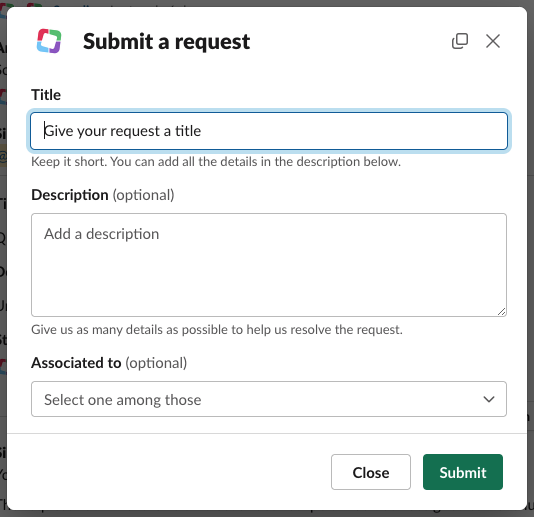
When an employee submit a request on Slack or Teams, a short form pop-up appears where the employee can fill-up and modify :
- Modify the title of its request,
- Add a description to the request
- Categorize the request to the right service or Application
Modify the title of its request,
Add a description to the request
Categorize the request to the right service or Application
[](https://downloads.intercomcdn.com/i/o/930483221/ce81e974ee2abb9ea892e236/Capture+d%E2%80%99e%CC%81cran+2024-01-11+a%CC%80+10.21.42.png?expires=1736177400&signature=e2dbd4bb91070d515db7fb61729afcc7d7c1e8cdc9d47c7e98ca0d332440f88c&req=fSMnEsF9n4NeFb4f3HP0gBAISGcBAJHNyRjd5i70nmAmr%2FxH7wZBtxaTTxa5%0Ad1gkQCS01frSKAP1OQ%3D%3D%0A)
Still, you've got the possibility to custom this form, add dynamic fields and choose optional or mandatory fields.
### **Change the requests attributes**
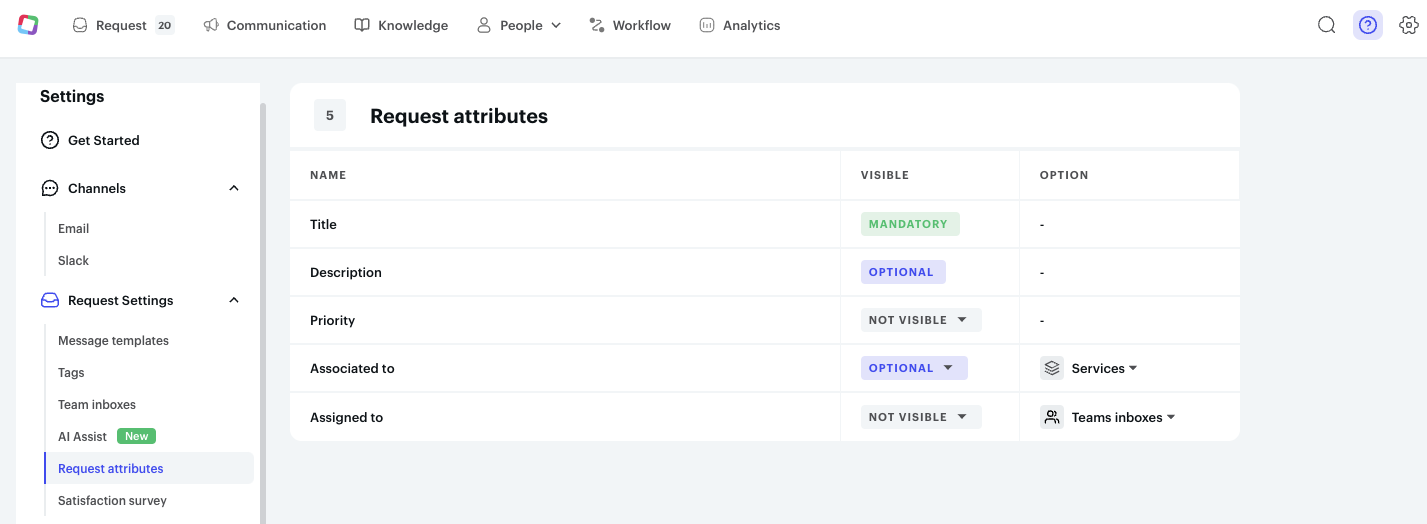
Regarding the generic fields displayed on the form, you can do some modifications on it.
To do so, on the Admin side, you just have to :
1. Click on ***the settings* ⚙️** (top right of the page)
2. On the left-hand menu, select "***Request attributes***"
3. Select the fields you want to put visible, the ones you want to put as mandatory
Click on ***the settings* ⚙️** (top right of the page)
On the left-hand menu, select "***Request attributes***"
Select the fields you want to put visible, the ones you want to put as mandatory
[](https://downloads.intercomcdn.com/i/o/930488338/44adb4c30a4f90d0fa423c47/Capture+d%E2%80%99e%CC%81cran+2024-01-11+a%CC%80+10.27.57.png?expires=1736177400&signature=707c56e8cfc32effc071d88559ced4702877ed8101c838fd71ee1404c4434337&req=fSMnEsF2noJXFb4f3HP0gJ4I4Dbv968w4ox5Ex2uZG%2BV1uVdDXDHkNij7Yd9%0AH%2FYvvtZ0CrmCF0uqxQ%3D%3D%0A)
### **Create custom and dynamic fields**
Based on the category ("**[Services](https://app.siit.io/services?tab=all)**") you have created, you can create custom forms with dynamic fields.
To do so, on the Admin side, you have to click first on the **People tab** \> **[Services](https://app.siit.io/services)**
[](https://downloads.intercomcdn.com/i/o/930491004/c6e14d557beab6bcdd28d61a/Capture+d%E2%80%99e%CC%81cran+2024-01-11+a%CC%80+10.31.10.png?expires=1736177400&signature=6762195067cc486138b1d55639af16afe74819b0d130adc0a621475d4ea33810&req=fSMnEsB%2FnYFbFb4f3HP0gBP7AThhgsZFCByysbDcuLe75UK8tFqsaiMx7NpI%0AlY7oIjMeNeULBQ5OGw%3D%3D%0A)
Then, all you have to do is selecting the "Service" you want to custom. And follow the steps as presented in the video below ⤵️
- [Getting started](https://help.siit.io/getting-started?hsLang=en#main-content)
- [For Admins](https://help.siit.io/getting-started?hsLang=en#for-admins)
- [Employee Guides](https://help.siit.io/getting-started?hsLang=en#employee-guides)
- [Request and Service Management](https://help.siit.io/request-and-service-management?hsLang=en#main-content)
- [Request](https://help.siit.io/request-and-service-management?hsLang=en#request)
- [Email](https://help.siit.io/request-and-service-management?hsLang=en#email)
- [Service catalog](https://help.siit.io/request-and-service-management?hsLang=en#service-catalog)
- [SLAs](https://help.siit.io/request-and-service-management?hsLang=en#slas)
- [App access](https://help.siit.io/request-and-service-management?hsLang=en#app-access)
- [AI & Agents](https://help.siit.io/ai-agents?hsLang=en#main-content)
- [Overview](https://help.siit.io/ai-agents?hsLang=en#overview)
- [Setup](https://help.siit.io/ai-agents?hsLang=en#setup)
- [Use cases](https://help.siit.io/ai-agents?hsLang=en#use-cases)
- [Automations and Workflows](https://help.siit.io/automations-and-workflows?hsLang=en#main-content)
- [Getting started](https://help.siit.io/automations-and-workflows?hsLang=en#getting-started)
- [Use cases](https://help.siit.io/automations-and-workflows?hsLang=en#use-cases)
- [Integrations](https://help.siit.io/automations-and-workflows?hsLang=en#integrations)
- [Reporting and Analytics](https://help.siit.io/reporting-and-analytics?hsLang=en)
- [Integrations](https://help.siit.io/integrations?hsLang=en#main-content)
- [Communication](https://help.siit.io/integrations?hsLang=en#communication)
- [HRIS](https://help.siit.io/integrations?hsLang=en#hris)
- [Ticketing](https://help.siit.io/integrations?hsLang=en#ticketing)
- [Knowledge base](https://help.siit.io/integrations?hsLang=en#knowledge-base)
- [Identity Provider](https://help.siit.io/integrations?hsLang=en#identity-provider)
- [Device Management](https://help.siit.io/integrations?hsLang=en#device-management)
- [Knowledge Base Management](https://help.siit.io/knowledge-base-management?hsLang=en)
- [Admin, Security & Workspace](https://help.siit.io/admin-security-workspace?hsLang=en#main-content)
- [Workspace Settings](https://help.siit.io/admin-security-workspace?hsLang=en#workspace-settings)
- [SSO (SAML)](https://help.siit.io/admin-security-workspace?hsLang=en#sso-saml)
- [SCIM & Provisioning](https://help.siit.io/admin-security-workspace?hsLang=en#scim-provisioning)
- [People & Directory](https://help.siit.io/admin-security-workspace?hsLang=en#people-directory)
[](http://siit.io)
Copyright © 2025, Siit SAS