---
title: Create and manage Inboxes
description: Create and manage Inboxes
---
[Skip to content](https://help.siit.io/inboxes-management#main-content)
[](https://help.siit.io/?hsLang=en)
- [Help Center](https://help.siit.io/)
- [Docs](https://docs.siit.io/)
- [API reference](https://developer.siit.io/api-reference/authentication)
- [Changelog](https://www.siit.io/changelog)
Open main navigation
Close main navigation
- [Help Center](https://help.siit.io/)
- [Docs](https://docs.siit.io/)
- [API reference](https://developer.siit.io/api-reference/authentication)
- [Changelog](https://www.siit.io/changelog)
How can we help?
- There are no suggestions because the search field is empty.
1. [Help center](https://help.siit.io/?hsLang=en)
2. [Request and Service Management](https://help.siit.io/request-and-service-management?hsLang=en)
3. [Request](https://help.siit.io/request-and-service-management?hsLang=en#request)
# Create and manage Inboxes
### 👀 Overview of Inboxes
In the internal ticketing management system world, employee requests are typically managed by Admins. In Siit, Admins are users with access to the platform to handle these requests.
To enhance efficiency, especially in organizations with multiple teams and admins, Siit introduces the concept of ***Inboxes***. An Inbox is a group of admins responsible for managing employee requests collectively. This feature allows for efficient request assignment and collaborative resolution.
### 🎯 Key benefits of Inboxes
1. **Assign requests to a group of admins**: distribute workload effectively.
2. **Define intelligent and advanced assignment rules**: use options like manual assignment, round-robin distribution, or balanced allocation.
3. **Enable collaboration within requests**: Admins from a same Inbox can interact, view, and take actions directly inside the request.
**Assign requests to a group of admins**: distribute workload effectively.
**Define intelligent and advanced assignment rules**: use options like manual assignment, round-robin distribution, or balanced allocation.
**Enable collaboration within requests**: Admins from a same Inbox can interact, view, and take actions directly inside the request.
### 🤔 How to configure Inboxes
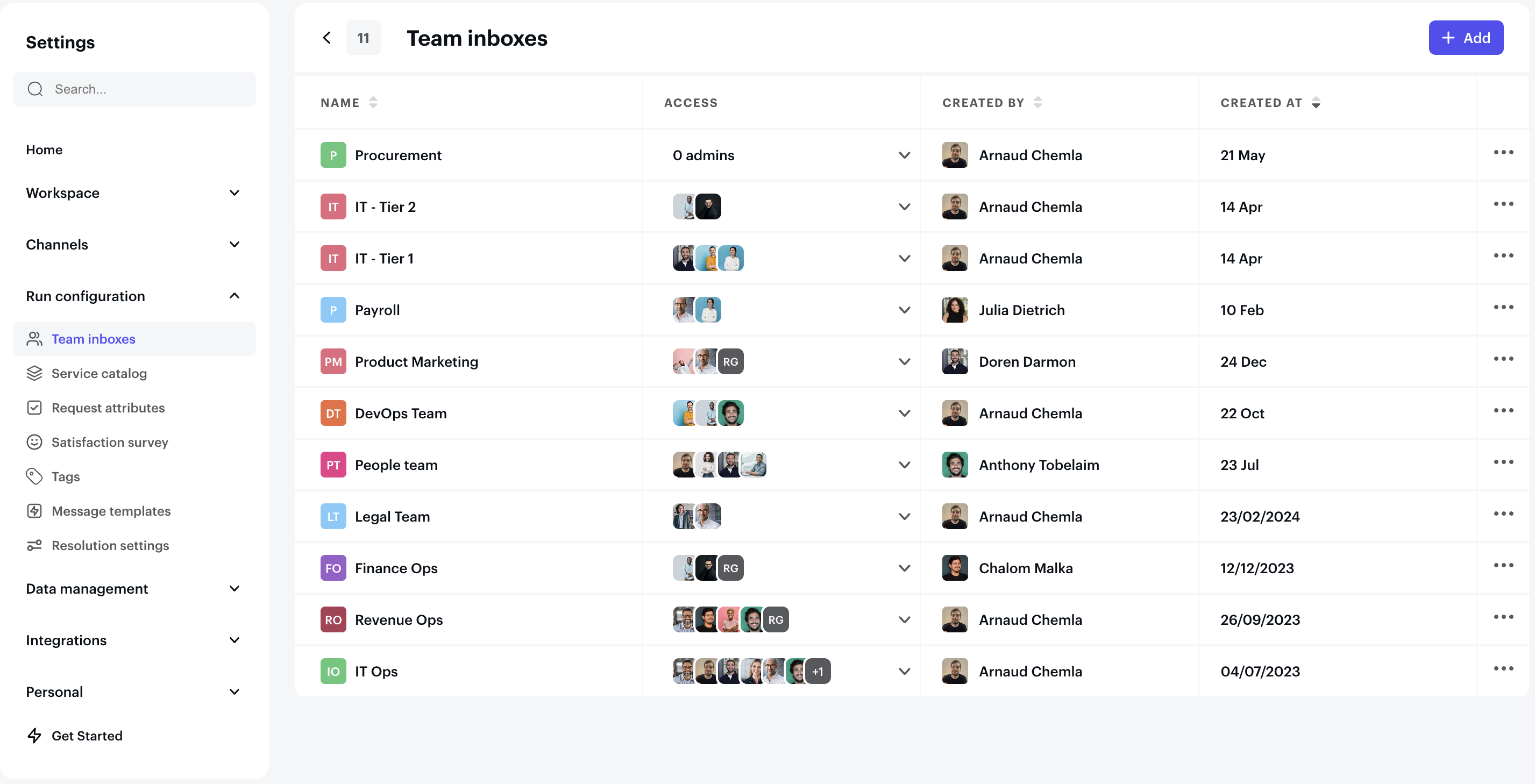
1. Navigate to **Settings** \> **Request Settings**.
2. Select **Inboxes**.
3. Click **Add**.
4. Provide a **Name** and select a **Color** to identify the Inbox.
5. Add the admins who will be part of the Inbox.
Navigate to **Settings** \> **Request Settings**.
Select **Inboxes**.
Click **Add**.
Provide a **Name** and select a **Color** to identify the Inbox.
Add the admins who will be part of the Inbox.
### Define the advanced Assignment
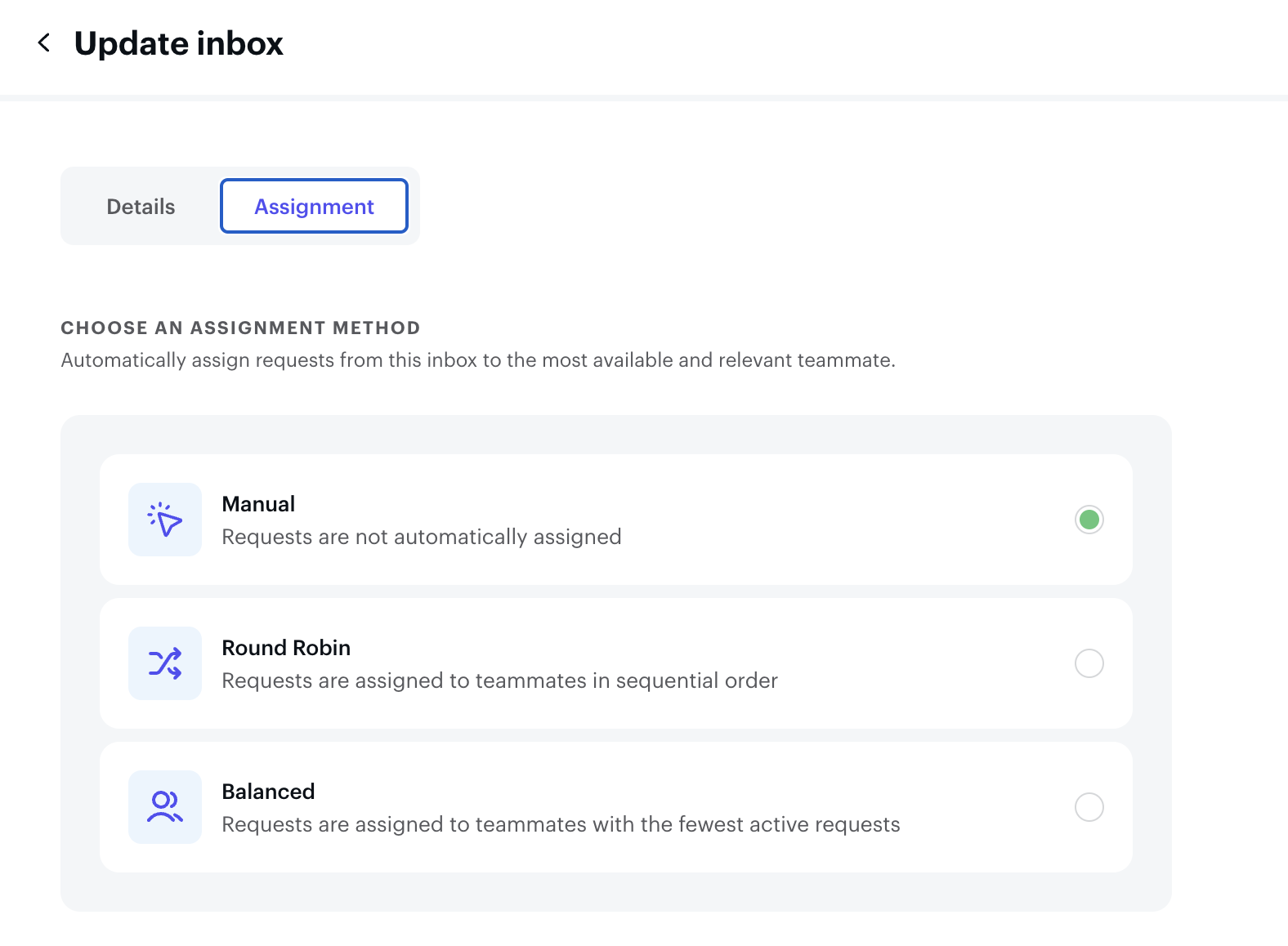
Once the request is automatically assigned to an inbox, you can decide how this one will be distributed to a specific Admin inside the inbox, following the below options:
[](https://downloads.intercomcdn.com/i/o/xjupiqnx/1310125691/f7fb3e5626c7e0149224ddbc86a0/Screenshot+2024-12-24+at+11_28_57.png?expires=1736177400&signature=134776ea7238b180f7e710a222f7ec322ea8954494c6d20514268c176ec1f47c&req=dSMmFsh8mIdWWPMW1HO4zXrTNi9ccMEbMWWGdx8PYSencKCm5IzJvtt0S2jI%0A79K8GsLpvRNzqktW16g%3D%0A)
### ✅ Attach Inboxes to Services
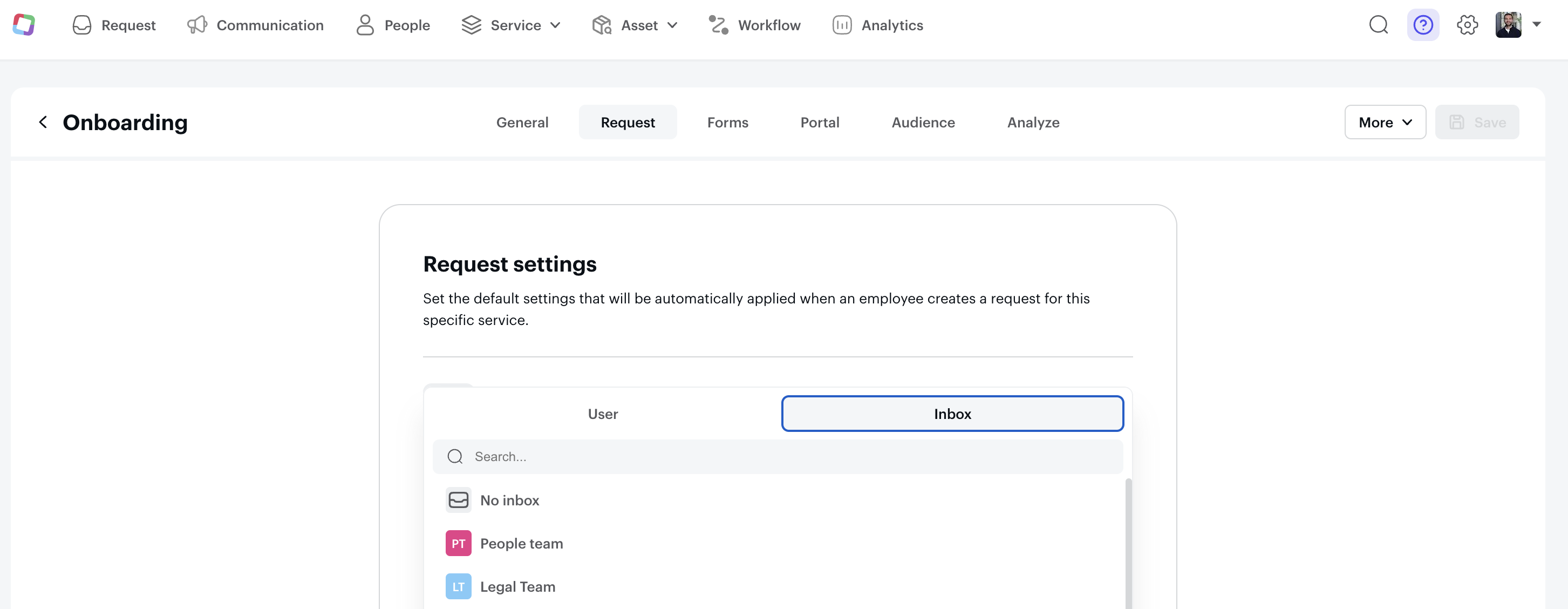
Once you’ve created your Inboxes, add them to specific **Services**. This ensures that any request raised for a service is automatically assigned to the appropriate Inbox.
[](https://downloads.intercomcdn.com/i/o/xjupiqnx/1310126916/6b81a63ceb79b9e4f6a79a5b9787/Screenshot+2024-12-24+at+11_30_06.png?expires=1736177400&signature=e89f5ea0a04305a68a7ef5b1bcd58c902a36bde8705742db6e586f9d7dd4965e&req=dSMmFsh8m4heX%2FMW1HO4zTQ3YK6X%2BVtmPo8BUJ8HU%2FCyq63pEcxqAVjLnhMc%0A9BtZmxYCe8rBkKnoOBg%3D%0A)
- [Getting started](https://help.siit.io/getting-started?hsLang=en#main-content)
- [For Admins](https://help.siit.io/getting-started?hsLang=en#for-admins)
- [Employee Guides](https://help.siit.io/getting-started?hsLang=en#employee-guides)
- [Request and Service Management](https://help.siit.io/request-and-service-management?hsLang=en#main-content)
- [Request](https://help.siit.io/request-and-service-management?hsLang=en#request)
- [Email](https://help.siit.io/request-and-service-management?hsLang=en#email)
- [Service catalog](https://help.siit.io/request-and-service-management?hsLang=en#service-catalog)
- [SLAs](https://help.siit.io/request-and-service-management?hsLang=en#slas)
- [App access](https://help.siit.io/request-and-service-management?hsLang=en#app-access)
- [AI & Agents](https://help.siit.io/ai-agents?hsLang=en#main-content)
- [Overview](https://help.siit.io/ai-agents?hsLang=en#overview)
- [Setup](https://help.siit.io/ai-agents?hsLang=en#setup)
- [Use cases](https://help.siit.io/ai-agents?hsLang=en#use-cases)
- [Automations and Workflows](https://help.siit.io/automations-and-workflows?hsLang=en#main-content)
- [Getting started](https://help.siit.io/automations-and-workflows?hsLang=en#getting-started)
- [Use cases](https://help.siit.io/automations-and-workflows?hsLang=en#use-cases)
- [Integrations](https://help.siit.io/automations-and-workflows?hsLang=en#integrations)
- [Reporting and Analytics](https://help.siit.io/reporting-and-analytics?hsLang=en)
- [Integrations](https://help.siit.io/integrations?hsLang=en#main-content)
- [Communication](https://help.siit.io/integrations?hsLang=en#communication)
- [HRIS](https://help.siit.io/integrations?hsLang=en#hris)
- [Ticketing](https://help.siit.io/integrations?hsLang=en#ticketing)
- [Knowledge base](https://help.siit.io/integrations?hsLang=en#knowledge-base)
- [Identity Provider](https://help.siit.io/integrations?hsLang=en#identity-provider)
- [Device Management](https://help.siit.io/integrations?hsLang=en#device-management)
- [Knowledge Base Management](https://help.siit.io/knowledge-base-management?hsLang=en)
- [Admin, Security & Workspace](https://help.siit.io/admin-security-workspace?hsLang=en#main-content)
- [Workspace Settings](https://help.siit.io/admin-security-workspace?hsLang=en#workspace-settings)
- [SSO (SAML)](https://help.siit.io/admin-security-workspace?hsLang=en#sso-saml)
- [SCIM & Provisioning](https://help.siit.io/admin-security-workspace?hsLang=en#scim-provisioning)
- [People & Directory](https://help.siit.io/admin-security-workspace?hsLang=en#people-directory)
[](http://siit.io)
Copyright © 2025, Siit SAS
```json
{
"@context" : "https://schema.org",
"@type" : "VideoObject",
"contentUrl" : "https://stream.mux.com/Ry01gwXQmDCXNg0201xkh5MPFsrNoeltx3b02xsR00uo00GGQ/capped-1080p.mp4",
"dateModified" : "2025-07-16T20:30:41.621Z",
"duration" : "PT53S",
"height" : 1660,
"name" : "CleanShot 2025-07-16 at 22.28.09",
"thumbnailUrl" : "https://25419906.fs1.hubspotusercontent-eu1.net/hubfs/25419906/CleanShot%202025-07-16%20at%2022.28.09.mp4/medium.jpg",
"uploadDate" : "2025-07-16T20:30:37.810Z",
"width" : 2938
}
```